Why Version Control Exists: The Pendrive Nightmare
Back in the day, sharing code meant emailing files around, which got pretty messy. Teams usually had someone with a USB drive marked "FINAL_VERSION" to keep track of the code. This setup often led to mistakes, like accidentally overwriting a teammate's work, showing just how much we needed better version control systems.
Version control is super important because it makes organizing and managing code way easier. It's like a must-have tool that stops mistakes and lets everyone on the team work together smoothly without messing up each other's stuff.
The Pendrive Analogy in Software Development
Imagine this: You're working on a project with three other developers, but there's no Git or version control system. Instead, you're juggling USB drives, emails, and folders named final, final_v2, latest_final.
Day 1: The team kicks things off with a fresh start. The file project_v1.zip gets emailed around and saved on a USB drive. Everyone on the team has their own copy on their laptop.
Day 2:
You add a login feature and save it as
project_login_final.zipon your laptop.Your teammate Raj adds a payment system at the same time. He saves it as
project_payment_final.zip.Another teammate, Sarah, jumps in and sets up the database, saving it as
project_db_final.zip.
Now there are three different "final" versions, and nobody's really talking. Each team member thinks they've got the "official" version.
Day 3: You send your project_login_final.zip to the team. Raj is confused. "Is this newer than my payment version?" He looks at both files. Your code has 5 new files, and his has 8. He manually combines your changes into his version. Now Raj has a one-of-a-kind version that no one else has. It's a Frankenstein version.
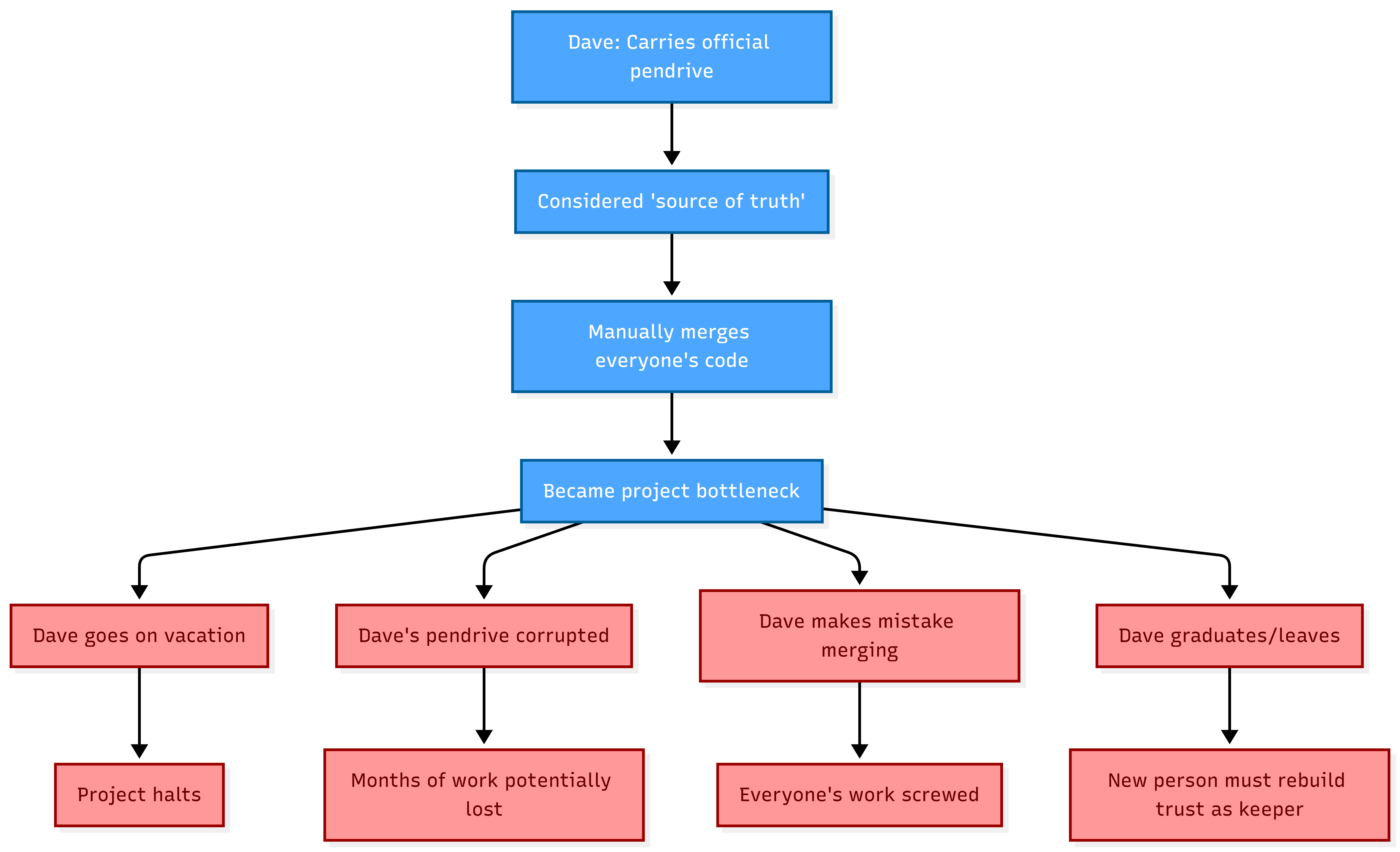
Day 4: Sarah gets Raj's version. But when she opens it, your login code isn't working right because Raj didn't quite get how your authentication system works. She tries to "fix" it by cutting out parts that seem broken. So, your 8 hours of work are messed up. Then she sends it to Dave, the USB drive hero, who carries it around.
Day 5: Dave copies the project to his computer and adds his API layer. Everything seems to work fine. He updates the USB drive with LATEST_FINAL.zip and emails it to everyone.
Day 6: You get the USB drive and move your local files onto it, but surprise, surprise, there's a conflict. Your laptop shows one version, and the USB drive shows another. In a bit of a panic, you decide to go with the version from the USB drive, trusting it since Dave is the most senior team member.
At this point, your updates to the login code are gone, but you don't know about it yet.
Day 7: While testing, the app crashes because the database can't find the login table. Sarah's database code is missing, the payment integration isn't working, and the login system is messed up. Plus, Dave's two hours of work on the API got overwritten.
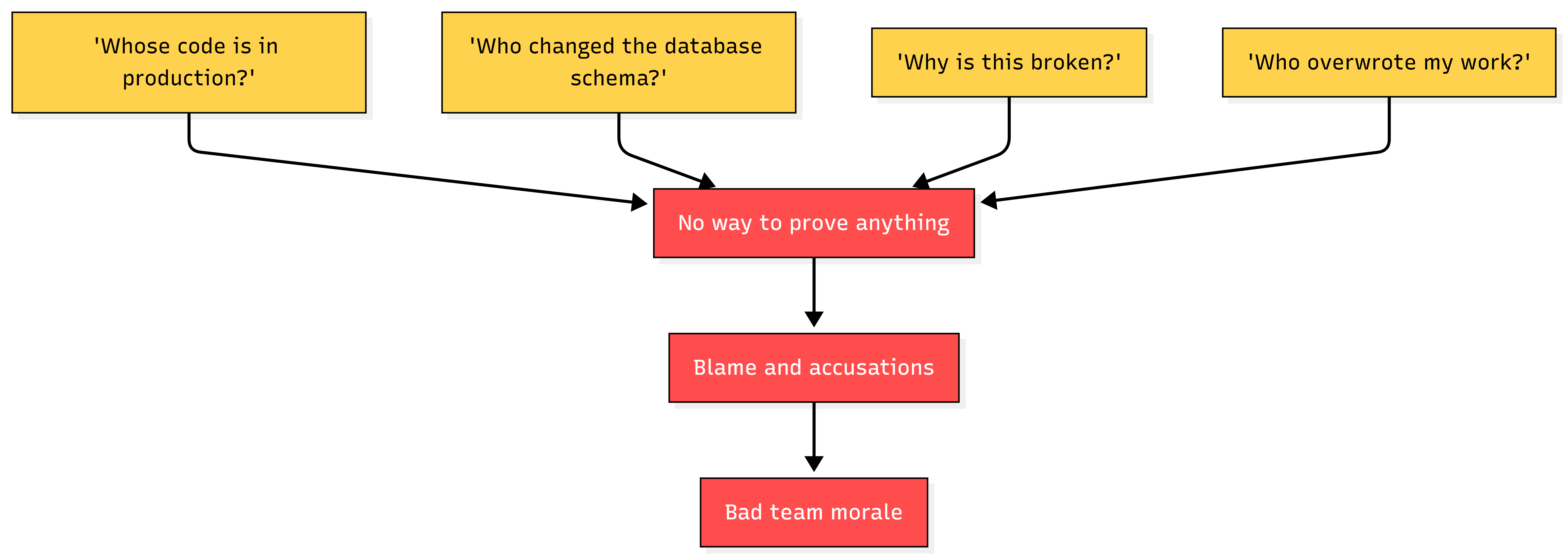
Everyone starts pointing fingers at each other.
Day 8: Dave goes through emails to figure out which version had what features. He remembers, "Didn't Sarah have the database working?" Sarah checks her laptop and finds a version from three days ago. Raj has a version he tweaked on his computer but never saved to the USB drive.
You spend four hours trying to piece the files together manually.
Day 9: The big deadline is here, and you launch what you think is the best version. Sadly, it crashes immediately. Users can't log in, the payment system is broken, and the database is a mess.
Problems Faced Before Version Control Systems
Here's a closer look at what went wrong in that situation:
1. Overwriting Code (The Worst Nightmare)
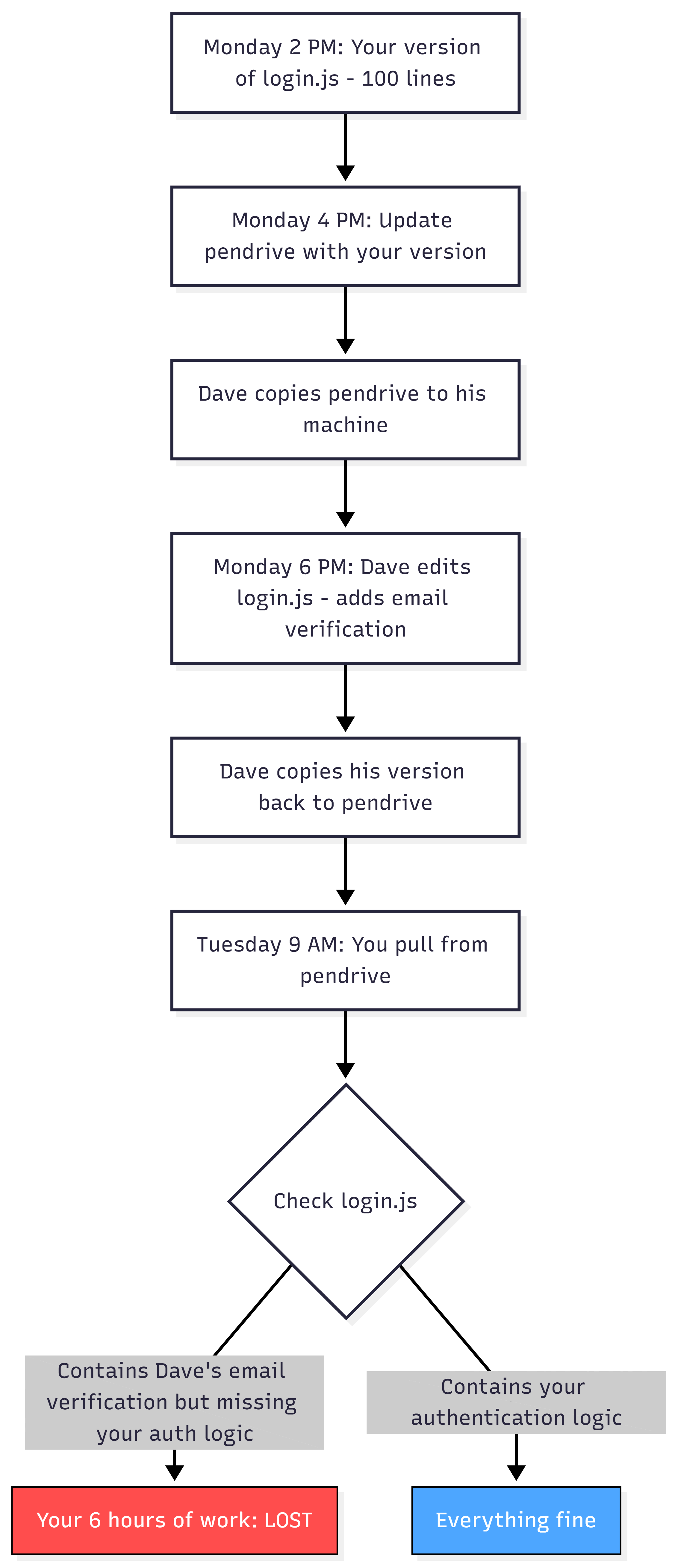
No merging process. No heads-up. No little note saying, "Hey, Dave changed this." Just vanished.
2. Lost Changes (Where Did It Go?)
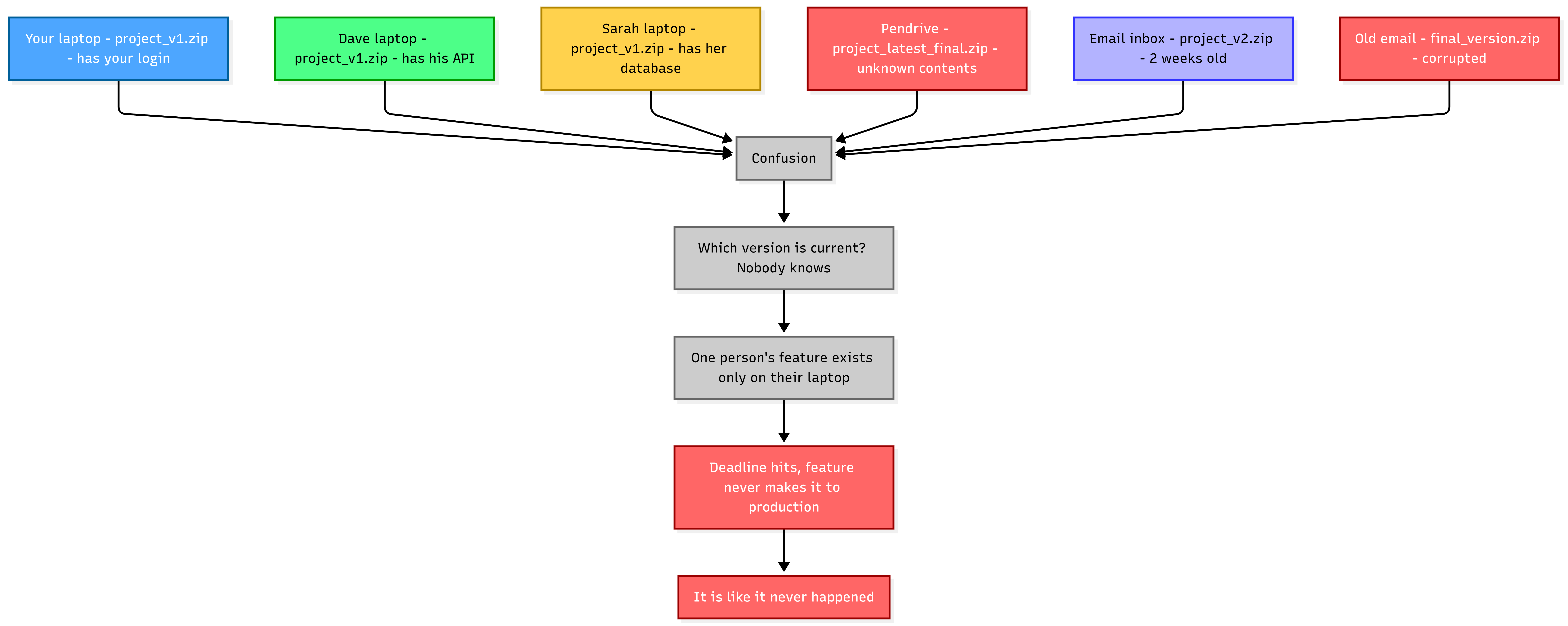
3.No Collaboration History (Forensics Nightmare)
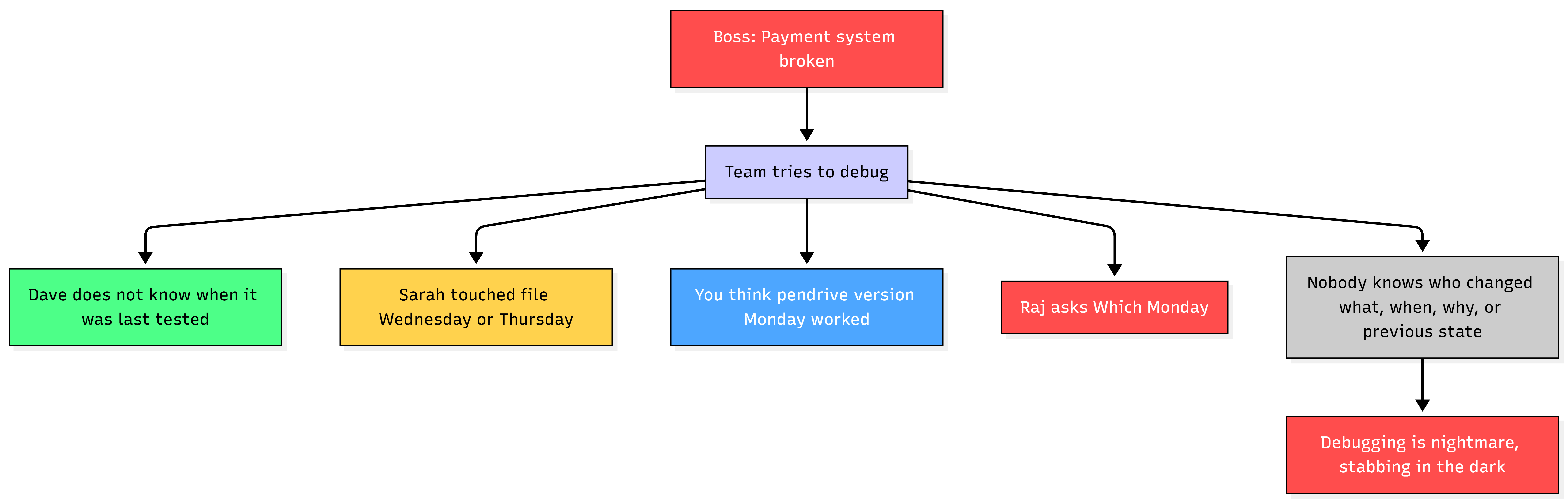
4. Multiple People, One File = Total Disaster
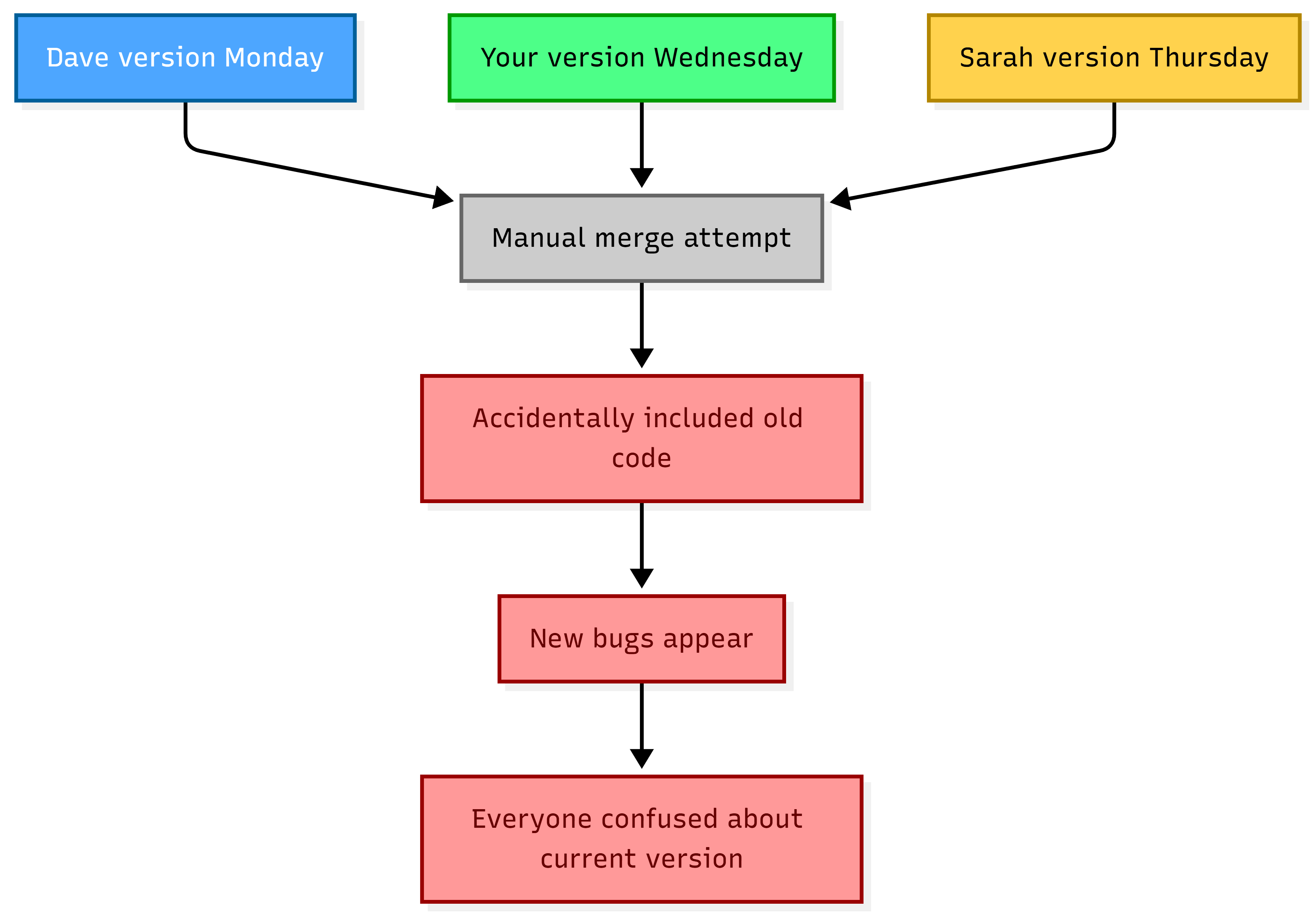
5. The Pendrive Hero Problem
Pendrive Workflow vs Version Control Workflow

Multiple Developers, Same File Without Version Control

Timeline - How Files Got Lost or Overwritten

Real-World Disaster Stories
Story 1: The Accidental Delete
A developer accidentally wiped out the src/ folder from the shared drive, which meant everyone's latest code was gone. If we had version control, we could have fixed this mess in just 2 seconds with the git revert command.
Story 2: The Overwrites
Two people were working on the same file at the same time, totally clueless about each other's work. One person emailed their version, while the other saved theirs to the drive. The last one to save ended up overwriting the other's work, leading to 12 hours of wasted effort. If we had Git, both versions could have been merged, or Git would have flagged the conflict for us to sort out.
Story 3: The Lost Senior Dev
A senior developer, who really knew the ins and outs of the codebase, left the company without leaving any notes on their changes. Now, nobody has a clue about what they changed or why. If we had been using git log and git blame, we could easily see every line they tweaked and check out their commit messages for the details.
Story 4: The Mystery Bug
A bug made its way into production and has been hanging around for three months. The team has no idea when it showed up, and figuring it out means sifting through over 100 changed files by hand. With git bisect, we could pinpoint the exact commit that introduced the bug in no time.
Problems That Made Version Control Mandatory
The Cascade Problem

The Scaling Problem

Once teams got bigger, using pendrives just didn't cut it anymore. We really needed centralized version control.
The Trust Problem
Why Version Control Became Mandatory (Not Optional)
Here's the turning point for every dev team:

Once teams started using Git, they saw how awesome it was and couldn't even think about going back to the old ways.
Key Realization: Version control went from being a "nice to have" to something we absolutely can't live without because:
Professionalism - You can't really call it real software development without version control.
Collaboration - Version control lets a bunch of people work together at the same time without any hiccups.
Safety - With version control, you never really lose data.
Accountability - Version control systems keep a clear record of who made each change, so teams can easily track who did what and when.
Speed - Automated merging and deployment make development way faster and smoother.
Recovery - With just one command, you can undo a disaster.


